
A complete, production-ready PHP login system built from scratch - with every security layer explained step by step. No frameworks, no Composer, just clean PHP 8 + PDO.
email: admin@a2zwebhelp.com | Password: password
Most PHP login tutorials on the internet are dangerously incomplete - they skip CSRF protection, use deprecated
md5() for passwords, or never handle brute-force attacks. In this tutorial, we're building it the
right way from the ground up. By the time you finish, you'll have a login system you'd actually be comfortable
deploying to a real project.
We'll use PDO with real prepared statements throughout (no string-concatenated SQL anywhere), Google's latest reCAPTCHA v3 for invisible bot detection, a proper brute-force lockout that tracks failed attempts per email in the database, and a Remember Me cookie system that stores only a hashed token - never the raw value - exactly the way modern frameworks do it.
What You'll Build
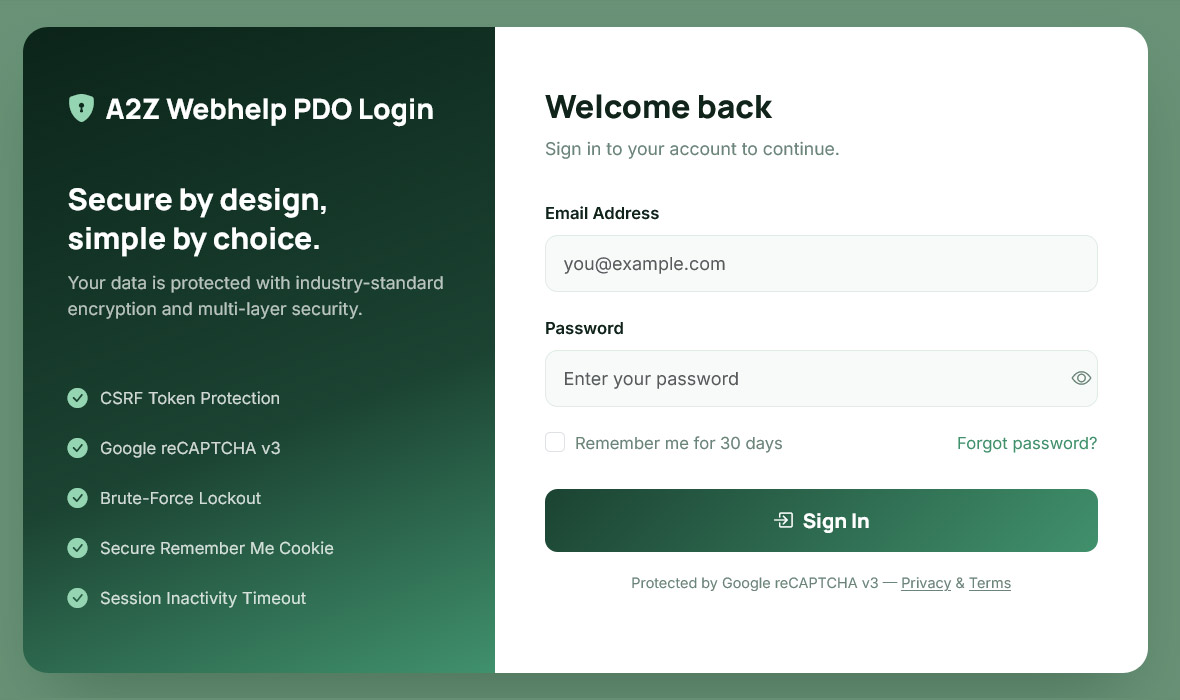
Here's a quick look at the finished project before we dive into code:
Styled Login Page
Split-panel design with form validation, password toggle, and live reCAPTCHA integration.
auth.php Library
One central file handling sessions, CSRF tokens, reCAPTCHA, lockout logic and Remember Me cookies.
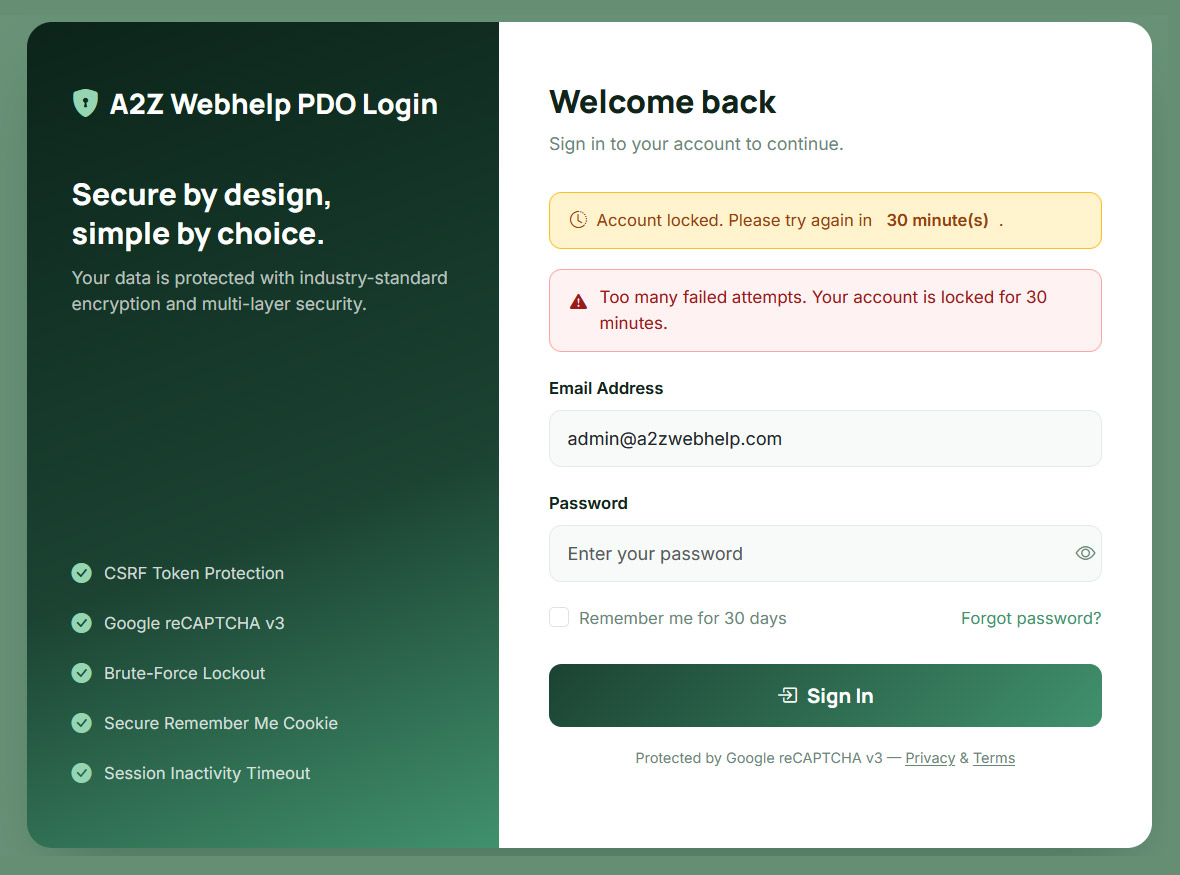
Lockout System
Tracks failed attempts in the DB. 5 failures in 30 minutes = account locked with a countdown.
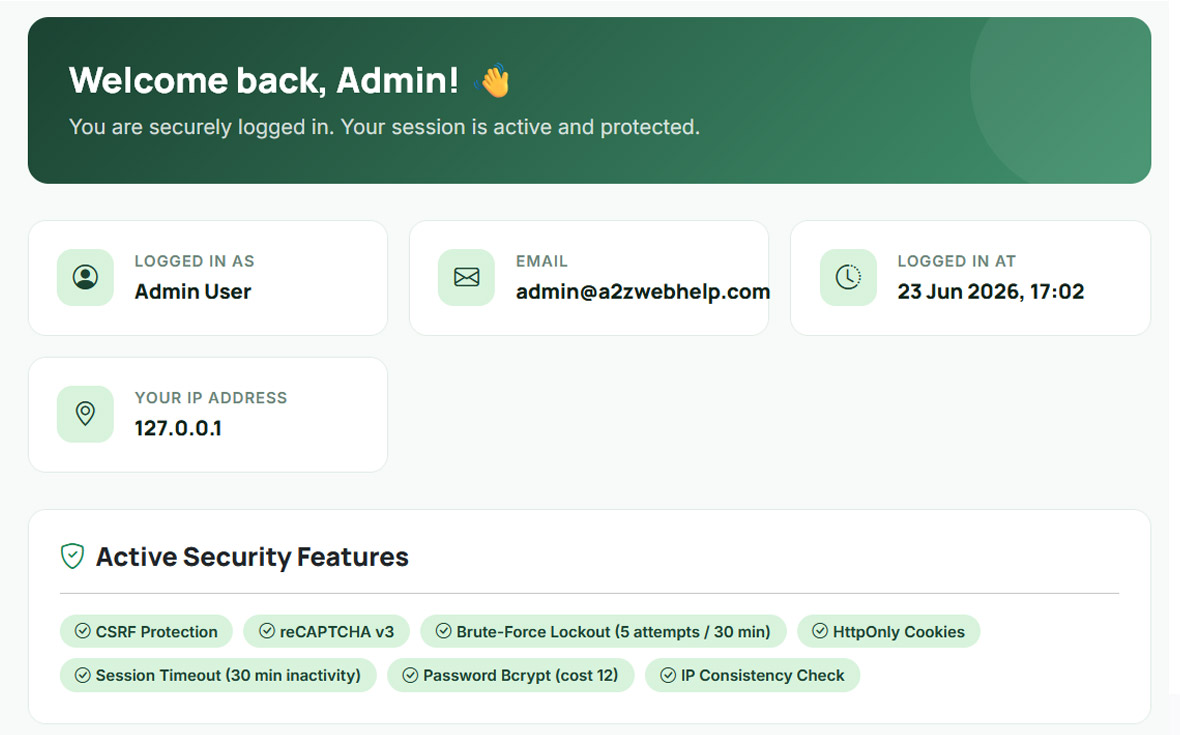
Protected Dashboard
A sample protected page showing session data, IP, and all active security features at a glance.
Prerequisites
- PHP 8.0 or higher
- MySQL 5.7+ or MariaDB
- A local server: XAMPP, Laragon, or WAMP
- A free Google reCAPTCHA v3 key pair (we'll set it up in Step 2)
- Basic knowledge of PHP, HTML, and SQL - no frameworks needed
Project File Structure
The entire system is 8 files. Here's what each one does before we start writing any code:
| File | What It Does |
|---|---|
| config.php | Central settings - DB credentials, reCAPTCHA keys, lockout limits, cookie & session config |
| db.php | PDO connection function (reused across every file) |
| auth.php | The security engine - every feature (CSRF, reCAPTCHA, lockout, Remember Me, session) lives here as functions |
| login.php | The login form + all POST handling logic |
| dashboard.php | A sample protected page - shows how to lock any page behind login |
| logout.php | Destroys the session and clears the Remember Me cookie |
| database.sql | Creates the database, 3 tables, and a seeded admin user |
| README.md | Setup instructions for the download package |
Understanding the Security Layers
Before we write a single line of code, it helps to understand what we're building and why each layer matters. Think of this login system as an airport security checkpoint - each layer is a separate gate, and attackers have to bypass all of them to get through.
PDO Prepared Statements
Every database query uses bound parameters. SQL injection is impossible because user input is never concatenated into SQL strings.
CSRF Tokens
A unique random token is embedded in the form and stored in the session. Any forged cross-site request will fail the hash_equals() check.
reCAPTCHA v3
Runs invisibly in the background - no checkbox for real users. Google scores each request 0.0 (bot) to 1.0 (human). We reject anything below 0.5.
Brute-Force Lockout
After 5 failed attempts within 30 minutes, the account is locked. A countdown timer shows the user exactly when they can try again.
Remember Me Cookie
Generates a cryptographically random token. Only the SHA-256 hash is stored in the DB. The token rotates on every use to prevent replay attacks.
Session Hardening
Sessions regenerate on login (fixing session fixation), expire after 30 min of inactivity, and are killed if the IP address changes mid-session.
1Database Setup
We need three tables. The users table stores credentials, login_attempts powers the
lockout system, and user_sessions tracks active sessions for multi-device awareness.
CREATE DATABASE IF NOT EXISTS secure_login_db
  CHARACTER SET utf8mb4 COLLATE utf8mb4_unicode_ci;
USE secure_login_db;

-- Users table
CREATE TABLE users (
    id             INT AUTO_INCREMENT PRIMARY KEY,
    name           VARCHAR(100)  NOT NULL,
    email          VARCHAR(150)  NOT NULL UNIQUE,
    password       VARCHAR(255)  NOT NULL,        -- bcrypt hash
    remember_token VARCHAR(64)   DEFAULT NULL,    -- hashed cookie token
    token_expires  DATETIME      DEFAULT NULL,
    is_active      TINYINT(1)   NOT NULL DEFAULT 1,
    created_at     TIMESTAMP     DEFAULT CURRENT_TIMESTAMP
) ENGINE=InnoDB DEFAULT CHARSET=utf8mb4;

-- Login attempts (for brute-force lockout)
CREATE TABLE login_attempts (
    id           INT AUTO_INCREMENT PRIMARY KEY,
    email        VARCHAR(150) NOT NULL,
    ip_address   VARCHAR(45)  NOT NULL,
    attempted_at TIMESTAMP    DEFAULT CURRENT_TIMESTAMP
) ENGINE=InnoDB DEFAULT CHARSET=utf8mb4;

-- Active sessions (optional multi-device tracking)
CREATE TABLE user_sessions (
    id            INT AUTO_INCREMENT PRIMARY KEY,
    user_id       INT          NOT NULL,
    session_token VARCHAR(64)  NOT NULL UNIQUE,
    ip_address    VARCHAR(45)  NOT NULL,
    user_agent    VARCHAR(255) DEFAULT NULL,
    created_at    TIMESTAMP    DEFAULT CURRENT_TIMESTAMP,
    FOREIGN KEY (user_id) REFERENCES users(id) ON DELETE CASCADE
) ENGINE=InnoDB DEFAULT CHARSET=utf8mb4;database.sql includes a default admin user with email admin@example.com and password Admin@1234. Change the password immediately after your first login.2Setting Up Google reCAPTCHA v3
reCAPTCHA v3 is the latest generation - it runs completely invisibly. There's no "I'm not a robot" checkbox for real users. Instead, Google analyzes user behaviour behind the scenes and returns a score between 0.0 (very likely a bot) and 1.0 (very likely human). We reject anything below 0.5.
To get your key pair:
- Go to google.com/recaptcha/admin/create
- Label: anything (e.g. "My Login System")
- Type: choose Score based (v3)
- Add your domain (e.g.
localhostfor local dev) - Submit - you'll get a Site Key (goes in HTML) and a Secret Key (stays on the server)
3config.php - Central Settings
Rather than scattering settings across multiple files, everything lives in config.php. Change your
lockout rules, reCAPTCHA threshold, or cookie expiry in one place and it applies everywhere.
<?php
// ── Database ──────────────────────────────────────────────────
define('DB_HOST',    'localhost');
define('DB_NAME',    'secure_login_db');
define('DB_USER',    'root');
define('DB_PASS',    '');
define('DB_CHARSET', 'utf8mb4');

// ── Site ──────────────────────────────────────────────────────
define('SITE_NAME', 'SecureApp');
define('SITE_URL',  'http://localhost/php-login-system');

// ── Google reCAPTCHA v3 ───────────────────────────────────────
define('RECAPTCHA_SITE_KEY',   'YOUR_SITE_KEY_HERE');
define('RECAPTCHA_SECRET_KEY', 'YOUR_SECRET_KEY_HERE');
define('RECAPTCHA_MIN_SCORE',  0.5);

// ── Login / Lockout ───────────────────────────────────────────
define('MAX_LOGIN_ATTEMPTS', 5);   // Lock after 5 failures
define('LOCKOUT_MINUTES',    30);  // Lock duration

// ── Remember Me Cookie ────────────────────────────────────────
define('COOKIE_NAME', 'remember_me');
define('COOKIE_DAYS', 30);

// ── Session ───────────────────────────────────────────────────
define('SESSION_NAME',    'SECURE_APP_SESSION');
define('SESSION_TIMEOUT', 1800); // 30 min inactivity4auth.php - The Security Engine
This is the heart of the system. All security logic lives here as clean, reusable functions. Let's go through each section and understand exactly what it does.
4a - Starting a Secure Session
A regular session_start() leaves you exposed to session fixation attacks and cookies that JavaScript
can steal. Our start_secure_session() function locks all of this down:
function start_secure_session(): void
{
    if (session_status() === PHP_SESSION_ACTIVE) return;

    session_name(SESSION_NAME);

    session_set_cookie_params([
        'lifetime' => 0,              // Expires when browser closes
        'path'     => '/',
        'secure'   => isset($_SERVER['HTTPS']), // HTTPS only in production
        'httponly' => true,           // JS cannot read the cookie
        'samesite' => 'Lax',          // Blocks cross-site cookie sending
    ]);

    session_start();

    // Regenerate ID on first start to prevent session fixation
    if (empty($_SESSION['__initiated'])) {
        session_regenerate_id(true);
        $_SESSION['__initiated'] = true;
    }
}
4b - Logging In and Checking Auth
When a user successfully authenticates, login_user() stores their details in the session, regenerates
the session ID (preventing session fixation on login), and records their IP for consistency checks:
function login_user(array $user): void
{
    start_secure_session();
    session_regenerate_id(true);  // New ID on every login

    $_SESSION['user_id']       = $user['id'];
    $_SESSION['user_name']     = $user['name'];
    $_SESSION['user_email']    = $user['email'];
    $_SESSION['user_ip']       = get_client_ip();
    $_SESSION['last_activity'] = time();
    $_SESSION['login_time']    = time();
}

function is_logged_in(): bool
{
    start_secure_session();
    if (empty($_SESSION['user_id'])) return false;

    // Inactivity timeout check
    if (isset($_SESSION['last_activity']) &&
        (time() - $_SESSION['last_activity']) > SESSION_TIMEOUT) {
        logout_user();
        return false;
    }
    $_SESSION['last_activity'] = time();

    // IP consistency check - kills hijacked sessions
    if (isset($_SESSION['user_ip']) &&
        $_SESSION['user_ip'] !== get_client_ip()) {
        logout_user();
        return false;
    }

    return true;
}
4c - CSRF Protection
CSRF (Cross-Site Request Forgery) is when a malicious website tricks a logged-in user's browser into submitting a form on your site without their knowledge. The defence is a secret random token that only your server and the real user's session know:
// Generate or reuse a token stored in session
function csrf_token(): string
{
    start_secure_session();
    if (empty($_SESSION['csrf_token'])) {
        $_SESSION['csrf_token'] = bin2hex(random_bytes(32)); // 64-char token
    }
    return $_SESSION['csrf_token'];
}

// Drop this inside every <form>: <?= csrf_field() ?>
function csrf_field(): string
{
    return '<input type="hidden" name="csrf_token" value="' . csrf_token() . '">';
}

// Validate on POST - hash_equals() prevents timing attacks
function csrf_validate(): bool
{
    $submitted = $_POST['csrf_token'] ?? '';
    $stored    = $_SESSION['csrf_token'] ?? '';
    if (empty($submitted) || empty($stored)) return false;
    return hash_equals($stored, $submitted);
}hash_equals() instead of ===? Regular string comparison in PHP exits as soon as it finds a mismatched character - an attacker can exploit this timing difference to guess the token character by character. hash_equals() always takes the same amount of time regardless of where the strings differ.4d - reCAPTCHA v3 Verification
The JS loads reCAPTCHA and generates a token when the form is submitted. That token goes to Google's API where it's verified server-side. We never trust the score the browser claims - always verify on your server:
function verify_recaptcha(string $token): bool
{
    if (empty($token)) return false;

    $data = http_build_query([
        'secret'   => RECAPTCHA_SECRET_KEY,
        'response' => $token,
        'remoteip' => get_client_ip(),
    ]);

    $context  = stream_context_create([
        'http' => ['method' => 'POST',
                   'header' => "Content-Type: application/x-www-form-urlencoded\r\n",
                   'content' => $data, 'timeout' => 5]
    ]);

    $response = @file_get_contents(
        'https://www.google.com/recaptcha/api/siteverify',
        false, $context
    );

    if ($response === false) return false; // Fail closed if API unreachable

    $result = json_decode($response, true);

    // success = true AND score above threshold
    return isset($result['success'], $result['score'])
        && $result['success'] === true
        && $result['score'] >= RECAPTCHA_MIN_SCORE;
}false and blocks the login. This is intentional - it's safer to briefly block a real user than to leave the door open for bots during an API outage.4e - Brute-Force Lockout
Every failed login records the email and IP into login_attempts with a timestamp. Before each login
attempt, we count how many failures happened within the last 30 minutes. If it hits 5, we lock the account and
show a countdown:
function record_failed_attempt(string $email): void
{
    $pdo  = db_connect();
    $stmt = $pdo->prepare(
        "INSERT INTO login_attempts (email, ip_address) VALUES (:email, :ip)"
    );
    $stmt->execute([':email' => $email, ':ip' => get_client_ip()]);
}

function is_locked_out(string $email): bool
{
    $pdo  = db_connect();
    $stmt = $pdo->prepare(
        "SELECT COUNT(*) FROM login_attempts
         WHERE email = :email
           AND attempted_at >= NOW() - INTERVAL :mins MINUTE"
    );
    $stmt->bindValue(':email', $email,          PDO::PARAM_STR);
    $stmt->bindValue(':mins',  LOCKOUT_MINUTES, PDO::PARAM_INT);
    $stmt->execute();
    return (int) $stmt->fetchColumn() >= MAX_LOGIN_ATTEMPTS;
}

function lockout_remaining_minutes(string $email): int
{
    // Finds the earliest failure in the window, calculates time left
    $pdo  = db_connect();
    $stmt = $pdo->prepare(
        "SELECT attempted_at FROM login_attempts
         WHERE email = :email
           AND attempted_at >= NOW() - INTERVAL :mins MINUTE
         ORDER BY attempted_at ASC LIMIT 1"
    );
    $stmt->bindValue(':email', $email,          PDO::PARAM_STR);
    $stmt->bindValue(':mins',  LOCKOUT_MINUTES, PDO::PARAM_INT);
    $stmt->execute();
    $row = $stmt->fetch();
    if (!$row) return 0;
    $unlockAt  = strtotime($row['attempted_at']) + (LOCKOUT_MINUTES * 60);
    return max(0, (int) ceil(($unlockAt - time()) / 60));
}
4f - Remember Me Cookie
The "Remember Me" feature is one of the most commonly implemented insecurely. Storing the user ID alone in a cookie is terrible - anyone who sees the cookie can impersonate that user forever. Our approach:
- Generate a 64-character random token using
random_bytes() - Store only its SHA-256 hash in the database (just like passwords, we never store the raw value)
- Put
user_id:raw_tokenin the cookie - On verification, hash the token from the cookie and compare with the DB hash
- Rotate the token on every use - so even if an old cookie is stolen, it can't be reused
function set_remember_cookie(int $userId): void
{
    $token       = bin2hex(random_bytes(32)); // 64-char raw token
    $tokenHash   = hash('sha256', $token);   // Store only the hash
    $cookieValue = $userId . ':' . $token;
    $expires     = date('Y-m-d H:i:s', time() + (COOKIE_DAYS * 86400));

    // Save hash to DB
    $pdo  = db_connect();
    $stmt = $pdo->prepare("UPDATE users SET remember_token=:t, token_expires=:e WHERE id=:id");
    $stmt->execute([':t' => $tokenHash, ':e' => $expires, ':id' => $userId]);

    // Set HttpOnly, SameSite cookie
    setcookie(COOKIE_NAME, $cookieValue, [
        'expires'  => time() + (COOKIE_DAYS * 86400),
        'path'     => '/',
        'secure'   => isset($_SERVER['HTTPS']),
        'httponly' => true,
        'samesite' => 'Lax',
    ]);
}

function login_via_cookie(): bool
{
    if (empty($_COOKIE[COOKIE_NAME])) return false;
    [$userId, $token] = explode(':', $_COOKIE[COOKIE_NAME], 2);
    $tokenHash = hash('sha256', $token);

    $pdo  = db_connect();
    $stmt = $pdo->prepare(
        "SELECT * FROM users WHERE id=:id AND remember_token=:token
         AND token_expires > NOW() AND is_active=1"
    );
    $stmt->execute([':id' => (int)$userId, ':token' => $tokenHash]);
    $user = $stmt->fetch();

    if (!$user) { setcookie(COOKIE_NAME, '', time()-3600, '/'); return false; }

    login_user($user);
    set_remember_cookie($user['id']); // Rotate token
    return true;
}5login.php - The Form & Handler
The login page has two jobs: show the form (with all security fields pre-wired), and process the POST. Here's the full flow of what happens when someone hits Submit:
csrf_validate() compares the submitted token with the session token. If they don't match, the request is rejected immediately.verify_recaptcha() sends the JS-generated token to Google's API and checks the score. Score below 0.5 = rejected.is_locked_out() queries the login_attempts table. If 5+ failures exist in the last 30 minutes, the form is blocked and a countdown is shown.is_active = 1. We deliberately don't tell the user whether the email or password was wrong (generic error message).password_verify() compares the submitted password against the bcrypt hash. On failure, record_failed_attempt() is called and the remaining attempts counter updates.clear_failed_attempts() wipes the attempt log, login_user() starts the session, CSRF token is regenerated, Remember Me cookie is set if checked, then redirect to dashboard.if ($_SERVER['REQUEST_METHOD'] === 'POST') {
// 1. CSRF
if (!csrf_validate()) {
$error = 'Invalid form submission. Please refresh and try again.';
}
// 2. reCAPTCHA
elseif (!verify_recaptcha($_POST['g-recaptcha-response'] ?? '')) {
$error = 'reCAPTCHA verification failed. Please try again.';
}
else {
$email = trim($_POST['email'] ?? '');
$password = $_POST['password'] ?? '';
$remember = isset($_POST['remember']);
// 3. Basic validation
if (!filter_var($email, FILTER_VALIDATE_EMAIL)) {
$error = 'Please enter a valid email address.';
}
// 4. Lockout check
elseif (is_locked_out($email)) {
$mins = lockout_remaining_minutes($email);
$error = "Account locked. Try again in $mins minute(s).";
}
else {
// 5. User lookup
$stmt = $pdo->prepare("SELECT * FROM users WHERE email=:e AND is_active=1");
$stmt->execute([':e' => $email]);
$user = $stmt->fetch();
// 6. Password verify
if (!$user || !password_verify($password, $user['password'])) {
record_failed_attempt($email);
$rem = attempts_remaining($email);
$error = "Invalid credentials. $rem attempt(s) remaining.";
}
// 7. Success
else {
clear_failed_attempts($email);
login_user($user);
csrf_regenerate();
if ($remember) set_remember_cookie($user['id']);
header('Location: dashboard.php'); exit;
}
}
}
}
6Wiring Up reCAPTCHA v3 in the Form
reCAPTCHA v3 works differently from v2 - there's no widget the user interacts with. The JS runs silently, and
when the user clicks Submit, we ask Google for a score token right before the form posts:
reCAPTCHA v3 in the form
<!-- Load reCAPTCHA script in <head> -->
<script src="https://www.google.com/recaptcha/api.js?render=YOUR_SITE_KEY"></script>

<!-- Hidden field to carry the token to PHP -->
<input type="hidden" name="g-recaptcha-response" id="recaptchaToken">

<!-- In your form submit handler -->
<script>
document.getElementById('loginForm').addEventListener('submit', function(e) {
    e.preventDefault(); // Stop the form submitting immediately

    grecaptcha.ready(function() {
        grecaptcha.execute('YOUR_SITE_KEY', {action: 'login'}).then(function(token) {
            document.getElementById('recaptchaToken').value = token;
            document.getElementById('loginForm').submit(); // Now submit with token
        });
    });
});
</script>
7Protecting Any Page with require_login()
Every page in your app that needs authentication gets just two lines at the top. If the user isn't logged in,
they're sent to the login page. If they have a valid Remember Me cookie, they're silently logged in and continue:
Protecting a page
<?php
require_once 'auth.php';
require_login('login.php'); // Redirect here if not logged in

// Your protected page code here
echo "Welcome, " . htmlspecialchars($_SESSION['user_name']);
?>
8Logout - Clean Session Destruction
Logging out properly means destroying the session, clearing the Remember Me cookie from both the browser
and the database, and wiping the session array before calling session_destroy():
logout.php
<?php
require_once 'auth.php';
start_secure_session();
logout_user(); // Clears session + DB token + cookie
header('Location: login.php');
exit;
Production Security Checklist
Before going live, run through this list:
Item Why It Matters Status Replace RECAPTCHA_SITE_KEY & RECAPTCHA_SECRET_KEY Demo keys don't work on live domains Required Update DB_USER / DB_PASS Never use root in production Required Change the seeded admin password Default password is public Required Enable HTTPS secure cookie flag only works over HTTPSCritical Move config.php above the web root Prevents direct browser access to credentials Critical Add error_reporting(0) and ini_set('display_errors', 0) Never expose PHP errors to visitors Required Add a periodic cleanup job for old login_attempts rows Table will grow forever without it Recommended Set secure flag to true in session cookie params Detects HTTPS automatically in the code Done
Best Practices & Common Mistakes
Never use MD5 or SHA1 for passwords. These are hashing algorithms, not password hashing algorithms. They're fast - which is exactly the problem. Bcrypt is deliberately slow, making brute-force attacks take orders of magnitude longer.
Always use generic error messages. Don't tell the user "email not found" or "wrong password" separately - this lets attackers enumerate valid email addresses. Use a single message: "Invalid email or password."
Lockout by email, not just by IP. Attackers rotate IPs. Locking by email ensures the target account is protected regardless of where the attack originates.
Rotate the Remember Me token on every use. If an attacker somehow steals a cookie, rotating the token on the very next legitimate login invalidates it immediately.
Log security events. In production, write failed login attempts and lockout events to a log file or monitoring tool. Silent failures are hard to debug and impossible to audit.
Summary
In this tutorial you built a complete, production-grade PHP login system covering:
- PDO prepared statements - every DB query is injection-proof
- CSRF tokens with timing-attack-safe
hash_equals() comparison
- Google reCAPTCHA v3 - invisible to real users, verified server-side
- Brute-force lockout - 5 failures in 30 minutes triggers a countdown lock
- Remember Me cookie - hashed token, HttpOnly, rotating on every use
- Session hardening - fixation protection, inactivity timeout, IP consistency
Download the Full Source Code
All 8 files, database.sql, and setup instructions included. No account required.
email: admin@a2zwebhelp.com | Password: password
reCAPTCHA v3 works differently from v2 - there's no widget the user interacts with. The JS runs silently, and when the user clicks Submit, we ask Google for a score token right before the form posts:
<!-- Load reCAPTCHA script in <head> -->
<script src="https://www.google.com/recaptcha/api.js?render=YOUR_SITE_KEY"></script>
<!-- Hidden field to carry the token to PHP -->
<input type="hidden" name="g-recaptcha-response" id="recaptchaToken">
<!-- In your form submit handler -->
<script>
document.getElementById('loginForm').addEventListener('submit', function(e) {
e.preventDefault(); // Stop the form submitting immediately
grecaptcha.ready(function() {
grecaptcha.execute('YOUR_SITE_KEY', {action: 'login'}).then(function(token) {
document.getElementById('recaptchaToken').value = token;
document.getElementById('loginForm').submit(); // Now submit with token
});
});
});
</script>7Protecting Any Page with require_login()
Every page in your app that needs authentication gets just two lines at the top. If the user isn't logged in,
they're sent to the login page. If they have a valid Remember Me cookie, they're silently logged in and continue:
Protecting a page
<?php
require_once 'auth.php';
require_login('login.php'); // Redirect here if not logged in
// Your protected page code here
echo "Welcome, " . htmlspecialchars($_SESSION['user_name']);
?>
8Logout - Clean Session Destruction
Logging out properly means destroying the session, clearing the Remember Me cookie from both the browser
and the database, and wiping the session array before calling session_destroy():
logout.php
<?php
require_once 'auth.php';
start_secure_session();
logout_user(); // Clears session + DB token + cookie
header('Location: login.php');
exit;
Production Security Checklist
Before going live, run through this list:
Item Why It Matters Status Replace RECAPTCHA_SITE_KEY & RECAPTCHA_SECRET_KEY Demo keys don't work on live domains Required Update DB_USER / DB_PASS Never use root in production Required Change the seeded admin password Default password is public Required Enable HTTPS secure cookie flag only works over HTTPSCritical Move config.php above the web root Prevents direct browser access to credentials Critical Add error_reporting(0) and ini_set('display_errors', 0) Never expose PHP errors to visitors Required Add a periodic cleanup job for old login_attempts rows Table will grow forever without it Recommended Set secure flag to true in session cookie params Detects HTTPS automatically in the code Done
Best Practices & Common Mistakes
Never use MD5 or SHA1 for passwords. These are hashing algorithms, not password hashing algorithms. They're fast - which is exactly the problem. Bcrypt is deliberately slow, making brute-force attacks take orders of magnitude longer.
Always use generic error messages. Don't tell the user "email not found" or "wrong password" separately - this lets attackers enumerate valid email addresses. Use a single message: "Invalid email or password."
Lockout by email, not just by IP. Attackers rotate IPs. Locking by email ensures the target account is protected regardless of where the attack originates.
Rotate the Remember Me token on every use. If an attacker somehow steals a cookie, rotating the token on the very next legitimate login invalidates it immediately.
Log security events. In production, write failed login attempts and lockout events to a log file or monitoring tool. Silent failures are hard to debug and impossible to audit.
Summary
In this tutorial you built a complete, production-grade PHP login system covering:
- PDO prepared statements - every DB query is injection-proof
- CSRF tokens with timing-attack-safe
hash_equals() comparison
- Google reCAPTCHA v3 - invisible to real users, verified server-side
- Brute-force lockout - 5 failures in 30 minutes triggers a countdown lock
- Remember Me cookie - hashed token, HttpOnly, rotating on every use
- Session hardening - fixation protection, inactivity timeout, IP consistency
Download the Full Source Code
All 8 files, database.sql, and setup instructions included. No account required.
email: admin@a2zwebhelp.com | Password: password
Every page in your app that needs authentication gets just two lines at the top. If the user isn't logged in, they're sent to the login page. If they have a valid Remember Me cookie, they're silently logged in and continue:
<?php
require_once 'auth.php';
require_login('login.php'); // Redirect here if not logged in
// Your protected page code here
echo "Welcome, " . htmlspecialchars($_SESSION['user_name']);
?>8Logout - Clean Session Destruction
Logging out properly means destroying the session, clearing the Remember Me cookie from both the browser
and the database, and wiping the session array before calling session_destroy():
logout.php
<?php
require_once 'auth.php';
start_secure_session();
logout_user(); // Clears session + DB token + cookie
header('Location: login.php');
exit;
Production Security Checklist
Before going live, run through this list:
Item Why It Matters Status Replace RECAPTCHA_SITE_KEY & RECAPTCHA_SECRET_KEY Demo keys don't work on live domains Required Update DB_USER / DB_PASS Never use root in production Required Change the seeded admin password Default password is public Required Enable HTTPS secure cookie flag only works over HTTPSCritical Move config.php above the web root Prevents direct browser access to credentials Critical Add error_reporting(0) and ini_set('display_errors', 0) Never expose PHP errors to visitors Required Add a periodic cleanup job for old login_attempts rows Table will grow forever without it Recommended Set secure flag to true in session cookie params Detects HTTPS automatically in the code Done
Best Practices & Common Mistakes
Never use MD5 or SHA1 for passwords. These are hashing algorithms, not password hashing algorithms. They're fast - which is exactly the problem. Bcrypt is deliberately slow, making brute-force attacks take orders of magnitude longer.
Always use generic error messages. Don't tell the user "email not found" or "wrong password" separately - this lets attackers enumerate valid email addresses. Use a single message: "Invalid email or password."
Lockout by email, not just by IP. Attackers rotate IPs. Locking by email ensures the target account is protected regardless of where the attack originates.
Rotate the Remember Me token on every use. If an attacker somehow steals a cookie, rotating the token on the very next legitimate login invalidates it immediately.
Log security events. In production, write failed login attempts and lockout events to a log file or monitoring tool. Silent failures are hard to debug and impossible to audit.
Summary
In this tutorial you built a complete, production-grade PHP login system covering:
- PDO prepared statements - every DB query is injection-proof
- CSRF tokens with timing-attack-safe
hash_equals() comparison
- Google reCAPTCHA v3 - invisible to real users, verified server-side
- Brute-force lockout - 5 failures in 30 minutes triggers a countdown lock
- Remember Me cookie - hashed token, HttpOnly, rotating on every use
- Session hardening - fixation protection, inactivity timeout, IP consistency
Download the Full Source Code
All 8 files, database.sql, and setup instructions included. No account required.
email: admin@a2zwebhelp.com | Password: password
Logging out properly means destroying the session, clearing the Remember Me cookie from both the browser
and the database, and wiping the session array before calling session_destroy():
<?php
require_once 'auth.php';
start_secure_session();
logout_user(); // Clears session + DB token + cookie
header('Location: login.php');
exit;Production Security Checklist
Before going live, run through this list:
| Item | Why It Matters | Status |
|---|---|---|
Replace RECAPTCHA_SITE_KEY & RECAPTCHA_SECRET_KEY | Demo keys don't work on live domains | Required |
Update DB_USER / DB_PASS | Never use root in production | Required |
| Change the seeded admin password | Default password is public | Required |
| Enable HTTPS | secure cookie flag only works over HTTPS | Critical |
Move config.php above the web root | Prevents direct browser access to credentials | Critical |
Add error_reporting(0) and ini_set('display_errors', 0) | Never expose PHP errors to visitors | Required |
Add a periodic cleanup job for old login_attempts rows | Table will grow forever without it | Recommended |
Set secure flag to true in session cookie params | Detects HTTPS automatically in the code | Done |
Best Practices & Common Mistakes
Never use MD5 or SHA1 for passwords. These are hashing algorithms, not password hashing algorithms. They're fast - which is exactly the problem. Bcrypt is deliberately slow, making brute-force attacks take orders of magnitude longer.
Always use generic error messages. Don't tell the user "email not found" or "wrong password" separately - this lets attackers enumerate valid email addresses. Use a single message: "Invalid email or password."
Lockout by email, not just by IP. Attackers rotate IPs. Locking by email ensures the target account is protected regardless of where the attack originates.
Rotate the Remember Me token on every use. If an attacker somehow steals a cookie, rotating the token on the very next legitimate login invalidates it immediately.
Log security events. In production, write failed login attempts and lockout events to a log file or monitoring tool. Silent failures are hard to debug and impossible to audit.
Summary
In this tutorial you built a complete, production-grade PHP login system covering:
- PDO prepared statements - every DB query is injection-proof
- CSRF tokens with timing-attack-safe
hash_equals()comparison - Google reCAPTCHA v3 - invisible to real users, verified server-side
- Brute-force lockout - 5 failures in 30 minutes triggers a countdown lock
- Remember Me cookie - hashed token, HttpOnly, rotating on every use
- Session hardening - fixation protection, inactivity timeout, IP consistency
Download the Full Source Code
All 8 files, database.sql, and setup instructions included. No account required.
email: admin@a2zwebhelp.com | Password: password