Input/Output
The important aspect of C programming language is its ability to handle input and output (I/O). Even though C does not have the language construct for I/O operations, a set of functions designed to provide a standard I/O system for C programs has been defined. Here we will see the I/O features of C and various library of routines such as the printf, scanf, getchar and putchar functions. A program using these functions must include the standard header file in it using the directive.
#include
The printf() function
A call to printf function is of the form
printf (control string, arg1, agr2, …….....):
The control string governs the conversion, formatting and printing of the arguments of printf and arg1, arg2… arg n are arguments that represent individual output data items. The arguments can be written as consonants, single variable or array names or more complex expressions. Function references may also be included. In contrast to the scanf function, the arguments in printf function do not represent memory addresses and therefore they are not preceded by ampersands.
This function can be used to output any combinations of numerical values, single characters and strings. It is similar to the input function scanf but the purpose is to display the data. The printf function moves data from the computer's memory to the standard output device,
whereas the scanf function enters data from the standard int device and stores it in the computer"s main memory.
Format Descriptors
Format strings define how the input or output data is to be represented and interpreted internally. The control string is contained within double quotes. There must be one control sequence within each control string for each argument.
| Conversion control character | Meaning |
| %d | Print and scan as signed decimal integer |
| %u |
Print and scan as unsigned decimal integer |
| %s | Print and scan as a string |
| %f | Print and scan as floating point number |
| %e | Print and scan as scientific notation |
| %c | Print and scan as a character |
Escape Sequences
When a backslash () is used in front of a select group of characters, the compiler tells the computer to escape from the way these characters would normally be interpreted. Therefore, the combinations of backslash and these specific characters are called Escape Sequences. The table below lists common escape sequences.
| Escape Sequence | Meaning |
| newline | |
| h | horizontal tabulator |
| vertical tabulator | |
| a | to beep the speaker |
The printf statement
printf ("%c", 'a');
gives the output as: a
Similarly, the following statement
int n = 8;
print f ("%d", 8*n);
gives the output as: 64
The scanf() function
This library function can be used to enter any combination of numerical values, single characte s and strings. This function is the input analog of the printf function. A call to the scanf function is of the form
scanf (control string, arg1, arg2,……);
The control string contains conversion specifications according to which the characters from the standard input are interpreted and the results are assigned to the successive arguments arg1, arg2, etc. Scanf reads one data item from the input corresponding to each argument other than the control string, skipping whitespaces including newlines to find the next data item, and returns as function value the total number of functions successfully read. It returns EOF when the end of the input is reached.
#include <stdio.h>
function main()
{
    int a;
    scanf ("%d", &a);
}
The above example shows how value for the integer variable a is accepted. The scanf function gets the value from the user and stores. The value in the memory of the variable a which is variable. represented as &a. Hence when we use &symbol we refer to the address of the variable.
The getchar( ) function
The getchar function is a part of standard C language I/O library. It returns a character from a standard single input device. The function does not require any arguments though a pair of empty parentheses must follow the word getchar.
#include <stdio.h>
 main()
 {
    int c;
    c = getchar();
    printf ("%d", c);
 }
The general format is
character variable = getchar();
When it is equated to an int, it returns the ASCII value of the variable.
When it is equated to a character, it returns the character typed in
#include <stdio.h>
int main()
{
   char c;
   C = getchar();
   printf("%c", c);
}
The putchar() function
The putchar function, like getchar, is a part of the standard C language I/O library. It transmits a single character to a standard output device. The character being normally be transmitted will expressed as an argument to the function enclosed in parentheses following the word putchar.
The general format is
putchar (character variable);
#include <stdio.h>
int main()
{
    char c;
    c = getchar(); /* returns the ASCII value of the character */
    putchar (c);  / *prints the character back to the standard screen */
}
Type Conversions
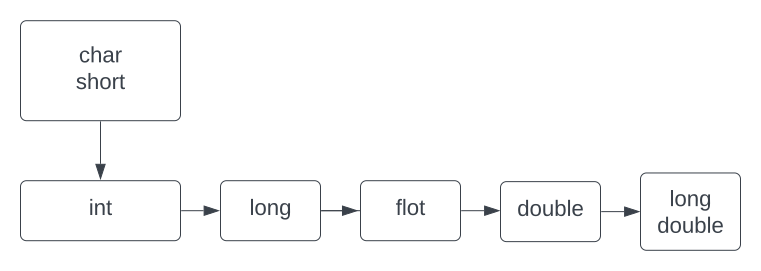
An expression may contain variables and constants of different types. C works with six data (types name int, unsigned int, long int, float. double and long double to perform all arithmetic operations. In general, if a binary operator has operands of different types, the lower type is promoted to the higher type before the operation proceeds. This data type conversion is performed both explicitly and implicitly.
Automatic type conversion
Any operand of the type char or short is implicitly converted to int before the operation. Conversion of char and short to int is called automatic unary conversion which is contrary to the automatic binary conversions wherein conversions apply to both operands of the binary operators and are carried out after automatic unary conversions.
If one operand is long double and the other is not, then the latter is converted to long double and the result is long double. This type of implicit conversion is also called as automatic type conversion. The rules are summarized in the following figure
Explicit Type Conversion
In addition to the conversions that are made automatically to operands in mixed arithmetic expressions, C also provides for a user-specified type conversion. The operator used to force the conversion of a value to another type is called the cast operator. This is a unary operator having the symbol
(data type)
where data type is the desired data type of the operand following the cast. For example, the expression
float a,b;
(int) (a * b)
assures that the value of the expression a*b is converted to an integer value The parantheses around the (a*b) are required because the cast operator has a higher precedence than the multiplication operator. In this example, value of a (of float data type) is cast into an integer before multiplication by b. The cast into an Integer value causes the fractional part of a's value to be truncated for the computation.